
Lessons from building my Joke Machine
I’ve been seeing many of these “how I built my faceless YouTube channel with AI” videos pop up lately. It does look like an interesting challenge: automate the entire process of ideating, developing, and publishing YouTube shorts. On the surface, it seems easy with Claude, but just how much would I be able to automate? There had to be some point that a human would need to intervene. But surely, if we can get AI to make slop, we can get it done autonomously to some extent, and apparently, make us some money on the side. These channels claim to bring in substantial income, and the streamers who preach the power and profitability of auto-slop appear to be raking it in, even peacocking their analytics to prove it. The potential of making side income while acting as a viral content studio director, all from the comfort of one’s laptop, was too alluring for me to leave unexplored.
So I set out to make a pipeline that generated short animated one-liner joke videos. I like one-liners: they’re short, only need two panels in the storyboard, simple enough to evaluate each phase. It’s easy to manage the quality of the output. I ensured that every phase required my approval. My strategy was to get a pipeline functional with manual approval for all steps, then once the resulting content was up to snuff, start fully automating everything. What I ended up with was something resembling this well-oiled machine, but needed a bit more maintenance along the way, and proved to be not so smart during the late-stage generative phase, and a little more costly than anticipated.
The idea: gate everything through Discord
Every stage produces something a human should sanity-check, and gets posted to a Discord channel with Approve/Reject buttons. No stage silently proceeds. No content goes out the door without my approval. This includes all creatives: a proposed one-liner, storyboard, and generated video. If I reject something, I can type in a suggestion for a better version of whatever it is I’m rejecting.
Concretely, that means three gates:
- After a joke is sourced — before any money or compute gets spent generating video for it, I approve or reject the joke itself.
- After a storyboard is generated — an image generator creates a simple two-panel storyboard for the video.
- After the video is generated — before anything gets published, I review the final video (with a suggested title and description already drafted) and can Accept, Request Changes with a comment, or edit the copy directly.
Discord ended up being a genuinely good choice for this, and not just because it was convenient. It’s already a place I check constantly, it supports rich interactive components (buttons, modals for free-text feedback) with zero custom UI work, and — critically — it’s project-agnostic. The approval channel module doesn’t know anything about jokes; it just knows how to render three generic content shapes (“joke,” “storyboard,” “video”) and resolve a decision. Point it at a different bot and channel and it’s reusable for a completely unrelated pipeline.
The implementation: stages, failures, and what actually shipped
The pipeline ended up with four real stages, each with its own swappable provider behind a common interface:
1. Joke sourcing. I used LaughFactory as a joke source, then added a second more kid-friendly source. The latter was the better choice since it had more true question/answer one-liner format jokes.
2. Script / storyboard. I started with Gemini to make the storyboard. It would read the joke, break it into panels, and generate a reference image for each one. It worked…kinda. Some of the storyboards were wildly inaccurate, and did not make any sense in the context of the accepted joke. Even such basic panels were mangled, and featured imagery that did not relate to the subject matter at all. It ignored even the most basic “reject” suggestions, such as the number of panels. I was getting storyboards over five panels long…for two lines of a joke! Letting Google draw the storyboard from so little source material was not working out.
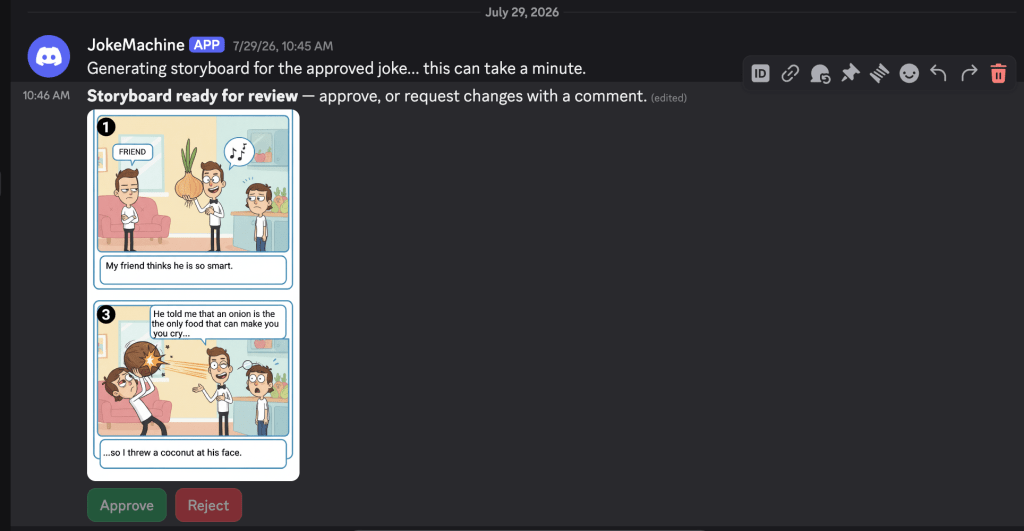
So I ripped it out in favor of a dead-simple manual script format: a markdown file with [PANEL 1] / Dialog: / Action: blocks that I write by hand, parsed by a small regex-based parser. Free, instant, and exactly the panel content and copy I want. This proved to be a better solution.
3. Video generation. This is where most of the real engineering — and most of the failures — happened. The first approach was one Veo call for the whole storyboard; Veo caps out around 8 seconds per clip, nowhere near enough for a multi-panel joke, and its own audio kept inventing on-screen dialogue with no way to suppress it. The fix: one silent Veo clip per panel (generate_audio=False), narration synthesized separately and verbatim via Gemini’s TTS model, then muxed and concatenated with ffmpeg. A Runway-based provider exists as a fallback for when Veo has an off day.
This part was great fun, but there was a cost. Since I was using online services, each video generation cost credits, which of course cost money. There’s no freebie for bad renders: if the pipeline makes a bad video or is just flat out hallucinating, it still costs money. I decided to refine this phase last, and migrate to using ComfyUI, an open-source framework that enables creators to generate video using their own hardware, rather than paying for cloud compute.
4. Publishing. For now, I’m just publishing to YouTube Shorts. The process was very easy actually, just some setup in my YouTube Studio dashboard and paste in an API key, and off I went. It was trivial to get the pipeline to hook into YouTube and upload the video with a custom title and description.
The result
Two jokes made it all the way through: sourced, approved, scripted, generated, reviewed, and published.
Neither is going to win an award. But that’s not really the point — the point was seeing how far the pipeline could go end-to-end without a human touching anything. It was able to automate everything except the two approval clicks, and perhaps a manual script edit or two.
The biggest lesson wasn’t that AI can automate the whole pipeline. It was that it can’t necessarily automate every step equally well. The best solution turned out to be a hybrid: let software handle the plumbing, let AI handle the parts it’s good at, and keep a human in the loop where quality still matters.
What now?
I’ve just installed ComfyUI, a framework that enables users to use their own hardware to render generated media, without having to buy credits from services like Runway. Sure, it renders slower and uses “outdated” models, but it’s free and I can break as many eggs as I want in pursuit of that perfect AI omelet. I’ve been messing around with it and it’s very intuitive, and fairly simple to get a generative workflow going with prefab models and patterns. So my next step is to migrate all this onto my PC and hook into ComfyUI for storyboard and video creation.
— J
 Josh Kimmelman
Leave a comment